
In last blog, I had covered setting up a controller node and worker node in K8S. Post setting up lab, we had covered how to deploy Antrea container plugin on top of it. In this blog, I will cover how to integrate k8S environment with Antrea plugin so we can manage container policies from within NSX environment. Below is the link to first part in case you missed it.
Securing K8S Pods using Antrea with NSX – Part 1
So let’s get started without any further delays.
- In order for Antrea management plane adapter and control plane adapter to communicate with NSX Manager, it requires a principal identity (PI) user which authenticates with NSX Manager. This requires a SSL certificate to be created for PI. As this is a lab environment, we will use openssl to generate a self signed SSL certificate using commands below –
openssl genrsa -out cluster-lab-private.key 2048
openssl req -new -key cluster-lab-private.key -out cluster-lab.csr -subj "/C=US/ST=CA/L=Palo Alto/O=VMware/OU=Antrea Cluster/CN=cluster-lab"
openssl x509 -req -days 3650 -sha256 -in cluster-lab.csr -signkey cluster-lab-private.key -out cluster-lab.crt
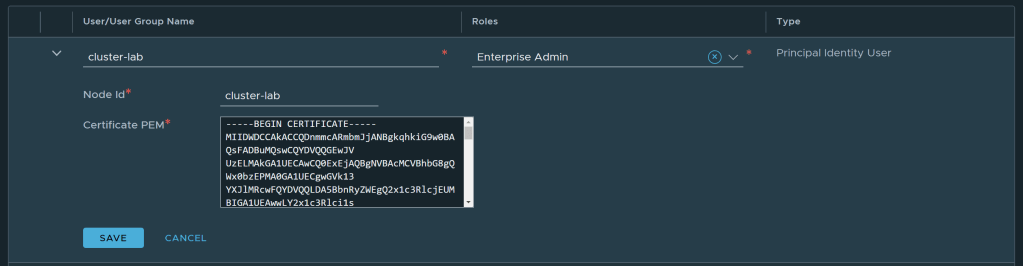
- Save the generated certificate file and export it to jump machine. Now head over to NSX Manager -> System -> Settings -> User Management -> User Role Assignment
- Click on Add and create a new Principal Identity with Role. Provide an appropriate name with role as Enterprise Admin and paste the certificate which you have created earlier.
- Click on save to create the PI.
- Next step is to identify the Antrea open source version currently installed on our K8S cluster. This is important as Antrea OSS version will identify which Antrea-NSX Interworking files we have to download from VMware customer connect portal. Use below commands to identify same –
#Use command below to identify name of Antrea Controller Pod
kubectl get pod -n kube-system -l component=antrea-controller

#After identifying name use below command to identify version
kubectl exec -it antrea-controller-6b8cb7cd59-wcjvd -n kube-system -- antctl version
- After identifying version, Go to VMware Customer Connect Portal and download Antrea-NSX Interworking Adapter Image and Manifest Bundle Under VMware Antrea Downloads. After download is complete, extract the zip file to find several yaml files which are –
| File Name | Description |
|---|---|
| interworking.yaml | YAML deployment manifest file to register an Antrea container cluster to NSX-T. |
| bootstrap-config.yaml | YAML file where you can specify the following details for registration: Antrea container cluster name, NSX Manager IP addresses, TLS certificate of the container cluster, and the private key of the container cluster. |
| deregisterjob.yaml | YAML manifest file to deregister an Antrea container cluster from NSX-T. |
| ns-label-webhook.yaml | Webhook definitions for automatically adding labels to newly created Kubernetes namespaces. This YAML file is used only when Kubernetes version is ≤ 1.20. |
| interworking-version.tar | Archive file for the container images of Management Plane Adapter and Central Control Plane Adapter. |
- As our K8S cluster is based on CentOS, we will be using VMware’s online Harbor registry to download images. Replace image field in interworking.yaml files with correct version and path as shown in figure –
projects.registry.vmware.com/antreainterworking/interworking-debian:0.9.0
- Next, modify the bootstrap-config.yaml file which contain important attribute such as Cluster Name, NSX Manager and TLS Certificate for PI. Modify following fields to reflect correct values –
clusterName - Unique name for Antrea Container cluster across all container clusters registered with NSX Manager
NSXManagers - IP address of NSX Managers to which Antrea will be registered
tls.crt - base64 value of TLS certificate created earlier for PI - use command "cat cluster-lab.crt | base64 -w 0" to convert same
tls.key - base64 value of TLS certificate private key created earlier for PI - use command "cat cluster-lab-private.key | base64 -w 0" to convert same
- As a last step, submit the bootstrap-config.yaml to K8S API server to apply the configuration.
kubectl apply -f bootstrap-config.yaml -f interworking.yaml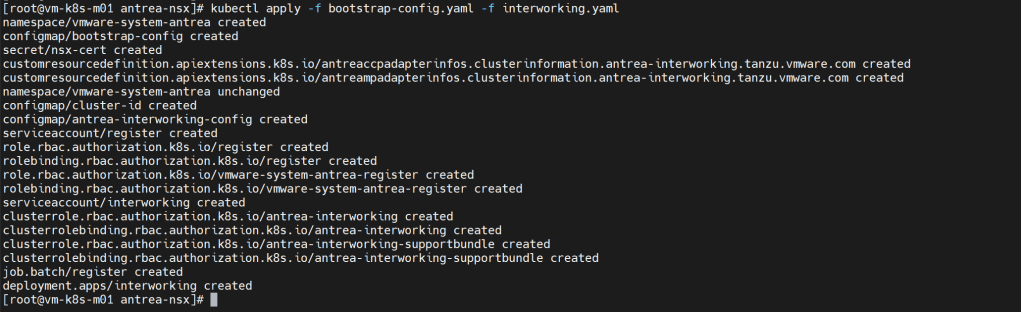
- This command registers the Antrea container cluster to NSX-T. The register-xxx and interworking-yyy Pods are deployed in the vmware-system-antrea namespace. Run the kubectl get pods to view the interworking pods in vmware-system-antrea namespace.
kubectl get pods -o wide -n vmware-system-antrea
- Head back to NSX Manager -> Inventory -> Containers. You should be able to see the Namespaces with CNI Type Antrea being reported back to NSX Manager from K8S cluster. This shows successful integration of Antrea with NSX Manager.
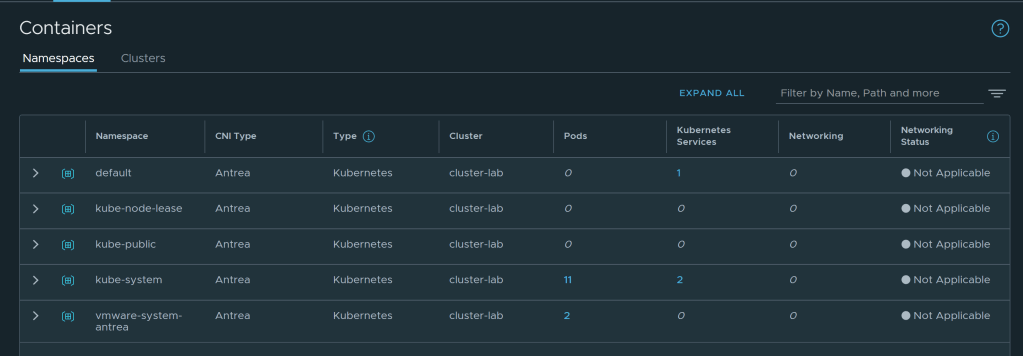
- Click on number highlighted in blue under Pods and you should be able to view all the pods running in selected Namespace.
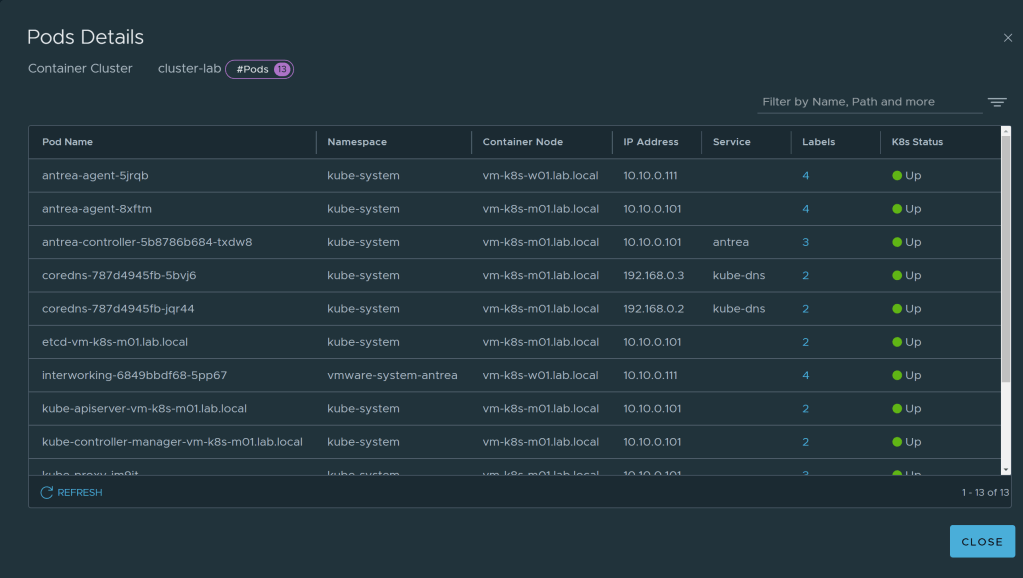
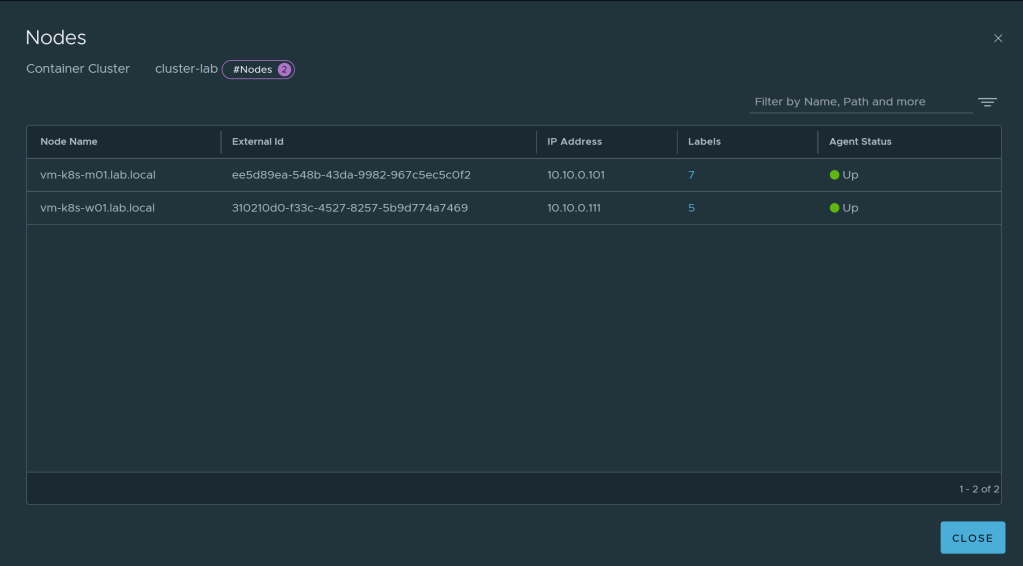
- Similarly, you can view nodes under Clusters. This shows successful polling of inventory in NSX Manager with help of Antrea NSX adapter installed on K8S cluster.
Conclusion
This blog covers the integration of Antrea CNI with NSX Manager with help of NSX Management plane adapter and Control plane adapter. We are able to successfully view the container objects within NSX Manager UI with help of Antrea. In next part of blog we will cover a bit of theory and see how this communication is actually working behind the scenes.
 VMvTips
One thought on “Securing K8S Pods using Antrea with NSX – Part 2”